rapier addon updated check now. Anyway in next plugin MakeIt3DPC (currently poslishing it) which use playcanvas as engine will have inbuilt rapier integration
Using latest version of Chrome, the plugin and latest Stable of Construct (458.2) - the placeholder system does not seem to work - running the Car example flashes the proper look for a second, after which all I see is a blue cube on a teal background. I can see the construct portion (yellow square) working. There are a bunch of unhandled exceptions in the Console - any idea what's happening?
Also, taking a texture from a Sprite seems to disable shading - the object become 100% emissive. Changing the shading model (Phong etc) gets me back the shading but I lose the texture. Is there any way to get the texture from a Sprite and shading?
Besides these two issues, great plugin - reminds me of the old Q3D.
So sorry but bought this plugin and it appears functional but it's really harsh to use things like mouse-look, there's no built-in mouse-look and or obvious way to do; camera rotation with the mouse and all mathematical attempts have yielded horrific results with jerky camera, spastic camera also tried the placeholder file with the mouse-look seemingly in it and the lerp(); function wasn't helping me much.
Why develop this without having a full-scope of 3D manipulation; mouse-look is fundamental to game development; take a look at blender or any other 3d model program...
There's also weird bugs with opening two projects at the same time that entirely screws up rendering and timing in the construct 3 engine... ; strangely requiring me to restart pc.
Hey,sorry for issues you're facing issues with plugin. when creating scene you can enable orbit controls to look around in scene. In next version of plugin it will have in built physics , character controllers, camera controller (with mouse look ) and minimal level editor. If you feel not satisfied with plugin I can refund you.
I'll happily give you the benefit of doubt and wait for the next update ; lets see what you can flow and do!
Did actually like the plugin up until the mouse-look issue drove me bonkers <3
Am excited to see; what's next if after that it doesn't provide then maybe I'll reconsider a refund but for now; you have my upholding; if it does then I will take back all my comments ( delete them ) then rereview, post a better response to this plugin and recommend it to others as a good 3d plugin.
Yes, In next addon Iam using playcanvas as game engine and rapier physics is added with it as in built. There will be a third person camera controller which is currently in testing (but you have to move your object your self so camera will free look around object and rotates object according to camera facing direction). I might add first person controller too and I really don't care about having negative reviews as they will make other people to properly investigate the plugin that what it will provide instead of rushing to purchase. Please join discord for regular updates
I couldn't evaluate the addon because my experience working with a native 3D camera from games I made was useless for understanding the logic of the new camera/separate viewport working through the addon.
I made a mistake by rushing to buy it without fully understanding how the addon works. If I had first tested the demo version of the addon on typical tasks, I definitely wouldn't have bought it.
Websites can have a canvas for 2D graphics and or canvas for 3D graphics ; we can have as many canvases as we want..
For 2d - html5 canvas is the programming toolbox for 2d: var 2dctx = document.getContext("2d");
For 3d - webgl is the programming toolbox for 3d: var 3dctx = document.getContext("webgl");
ThreeJS (Three.js) is a programmer toolbox to make webgl easier.
Construct 3 has it's own 2D and 3D canvases that work together which the Scirra team implemented.
This MakeIt3D Plugin; makes a new 3D Canvas to overlay above both of Construct 3 canvases.. which: Hidencod (MakeIt3D plugin developer) implemented.
The 3D camera aspect is mainly matrix calculations on the numerical data of 3d graphics;
A perspective projection matrix: is a mathematically calculated shape to provide a shrinking at the horizon effect also a disappearing from the front and back effect that is used with the calculations of the numerical data of 3d graphics.
How do I know all this? Because tried to implement threejs functionality without a plugin prior to using this with html files and function calls within construct 3 project and it was very painful..
Still don't understand what we can do with this tool in C3? Can you show more videos, examples, all ACEs available with the plugin?
You said "3D objects do not integrate with Construct's layout system, sprite behaviors, or collision detection." - so, what is it actually? Can I create 3D games with it, what kind of games? How to do this?
Why should I buy it? There are more questions than answers...
This addon actually creates and renders 3d objects on top of construct3 html layer. There is no direct relation between C3 objects like 3d shapes, sprites because they are handled by construct3 rendering system. With my plugin you can create 3d scene on whichever layer you like and add objects in runtime by actions ( currently there is no editor). Optionally you can sync construct3 sprites or 3d shapes positions to three.js object positions so you can do some level editing. This is not like mikal 3dobject plugin this is completely different which provides standalone rendering features. You can load custom 3d models, spine animations and also set Texture from construct3 sprite. You can also play with rapier addon which is active in development. You can use it it create games but level editor not there as of now
← Return to tool
Comments
Log in with itch.io to leave a comment.
Hey! I just bought the plugin and I'm having some trouble. The car example it's not working and I can’t get the Rapier addon to install.
Updated addon, can you check now?
The car example is working now, but I still can’t install the Rapier addon.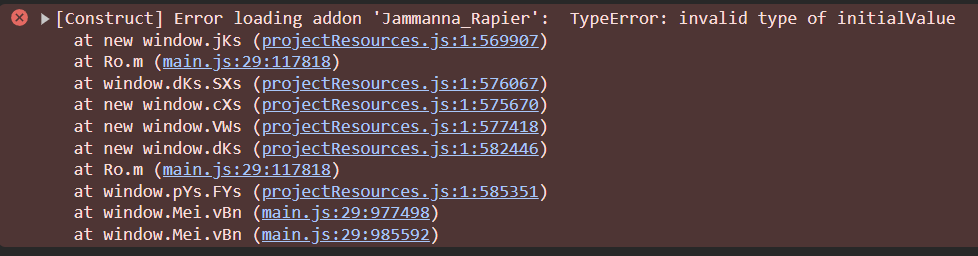
Oh I will check
rapier addon updated check now. Anyway in next plugin MakeIt3DPC (currently poslishing it) which use playcanvas as engine will have inbuilt rapier integration
Using latest version of Chrome, the plugin and latest Stable of Construct (458.2) - the placeholder system does not seem to work - running the Car example flashes the proper look for a second, after which all I see is a blue cube on a teal background. I can see the construct portion (yellow square) working. There are a bunch of unhandled exceptions in the Console - any idea what's happening?
Also, taking a texture from a Sprite seems to disable shading - the object become 100% emissive. Changing the shading model (Phong etc) gets me back the shading but I lose the texture. Is there any way to get the texture from a Sprite and shading?
Besides these two issues, great plugin - reminds me of the old Q3D.
Placeholder holder system only works on non worker mode. Disable workermode then try again
Got it. With Worker off:
-If I open the placeholder example, Construct cannot display the layout (corrupted layout icon).
-If I manually create an Object and set the logic- I get a black screen on Preview...car example issue is fixed, update addon now
Updated to 1.6.6 and the Car example works fine now. Thank you!
Is there any solution to my second question - texture from Sprite with shading?
So sorry but bought this plugin and it appears functional but it's really harsh to use things like mouse-look, there's no built-in mouse-look and or obvious way to do; camera rotation with the mouse and all mathematical attempts have yielded horrific results with jerky camera, spastic camera also tried the placeholder file with the mouse-look seemingly in it and the lerp(); function wasn't helping me much.
Why develop this without having a full-scope of 3D manipulation; mouse-look is fundamental to game development; take a look at blender or any other 3d model program...
There's also weird bugs with opening two projects at the same time that entirely screws up rendering and timing in the construct 3 engine... ; strangely requiring me to restart pc.
Hey,sorry for issues you're facing issues with plugin. when creating scene you can enable orbit controls to look around in scene. In next version of plugin it will have in built physics , character controllers, camera controller (with mouse look ) and minimal level editor. If you feel not satisfied with plugin I can refund you.
I'll happily give you the benefit of doubt and wait for the next update ; lets see what you can flow and do!
Did actually like the plugin up until the mouse-look issue drove me bonkers <3
Am excited to see; what's next if after that it doesn't provide then maybe I'll reconsider a refund but for now; you have my upholding; if it does then I will take back all my comments ( delete them ) then rereview, post a better response to this plugin and recommend it to others as a good 3d plugin.
Yes, In next addon Iam using playcanvas as game engine and rapier physics is added with it as in built. There will be a third person camera controller which is currently in testing (but you have to move your object your self so camera will free look around object and rotates object according to camera facing direction). I might add first person controller too and I really don't care about having negative reviews as they will make other people to properly investigate the plugin that what it will provide instead of rushing to purchase. Please join discord for regular updates
Discord channel
I couldn't evaluate the addon because my experience working with a native 3D camera from games I made was useless for understanding the logic of the new camera/separate viewport working through the addon.
I made a mistake by rushing to buy it without fully understanding how the addon works. If I had first tested the demo version of the addon on typical tasks, I definitely wouldn't have bought it.
No problem I could refund it
What's your mail?
Websites can have a canvas for 2D graphics and or canvas for 3D graphics ; we can have as many canvases as we want..
For 2d - html5 canvas is the programming toolbox for 2d:
var 2dctx = document.getContext("2d");
For 3d - webgl is the programming toolbox for 3d:
var 3dctx = document.getContext("webgl");
ThreeJS (Three.js) is a programmer toolbox
to make webgl easier.
Construct 3 has it's own 2D and 3D canvases that work together which the Scirra team implemented.
This MakeIt3D Plugin; makes a new 3D Canvas to overlay above both of Construct 3 canvases.. which:
Hidencod (MakeIt3D plugin developer) implemented.
The 3D camera aspect is mainly matrix calculations on the numerical data of 3d graphics;
A perspective projection matrix:
is a mathematically calculated shape to provide a shrinking at the horizon effect also a disappearing from the front and back effect that is used with the calculations of the numerical data of 3d graphics.
How do I know all this?
Because tried to implement threejs functionality without a plugin prior to using this with html files and function calls within construct 3 project and it was very painful..
are the ACES in this plugin exposed to the scripting interface? or just events?
Currently they are not exposed but you can interact with three.js objects by accessing them with objectId. Refer this : https://make-it-3d.vercel.app/docs/aces_makeit3d/scripting
Still don't understand what we can do with this tool in C3? Can you show more videos, examples, all ACEs available with the plugin?
You said "3D objects do not integrate with Construct's layout system, sprite behaviors, or collision detection." - so, what is it actually? Can I create 3D games with it, what kind of games? How to do this?
Why should I buy it? There are more questions than answers...
This addon actually creates and renders 3d objects on top of construct3 html layer. There is no direct relation between C3 objects like 3d shapes, sprites because they are handled by construct3 rendering system. With my plugin you can create 3d scene on whichever layer you like and add objects in runtime by actions ( currently there is no editor). Optionally you can sync construct3 sprites or 3d shapes positions to three.js object positions so you can do some level editing. This is not like mikal 3dobject plugin this is completely different which provides standalone rendering features. You can load custom 3d models, spine animations and also set Texture from construct3 sprite. You can also play with rapier addon which is active in development. You can use it it create games but level editor not there as of now
The plugin adds a library threejs.org
You can do anything you want using your imagination, even VR as far as I know. Redrawing happens outside of C3 as a separate HTML layer.
Here is an example in pure Three.js https://helloenjoy.itch.io/hellorun
With the C3 plugin, these capabilities are available to you as well.
:-)